
Next.js JWT Authentication is one of the most important concepts in modern web development.. If you are building a modern application using Next.js App Router, then understanding how to use JWT authentication with GraphQL is extremely valuable.
In this tutorial, you will learn:
- How JWT authentication works in Next.js
- How to use GraphQL in Next.js
- How to store JWT tokens securely
- How to create protected routes using middleware
- How to create reusable GraphQL utilities
- How to structure a Next.js App Router project
This guide uses simple English and beginner-friendly examples.
The implementation shown in this article is based on a real-world Next.js authentication setup using GraphQL and cookies.
What is JWT Authentication?
JWT stands for JSON Web Token.
A JWT token is used to identify authenticated users.
After successful login:
- Server generates a token
- Token is stored in cookies
- Browser sends token automatically with requests
- Protected routes verify the token
Benefits of Next.js JWT Authentication
Using JWT authentication in Next.js provides:
- Secure authentication
- Stateless sessions
- Easy scalability
- Better API security
- Simple frontend-backend communication
Why Use GraphQL with Next.js?
GraphQL helps you:
- Fetch only required data
- Create flexible APIs
- Reduce multiple REST calls
- Improve frontend development experience
Next.js App Router Folder Structure
A clean folder structure is very important in large applications.
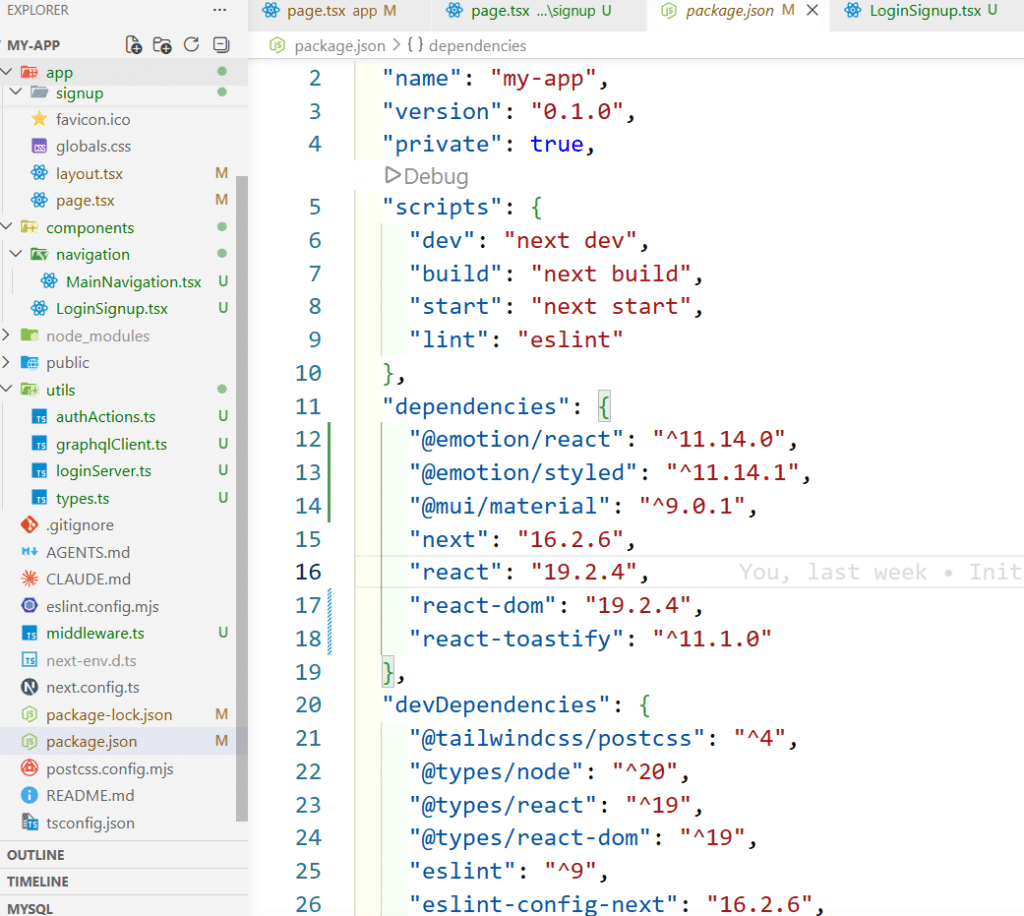
Recommended App Router Structure
src
│
├── app
│   ├── layout.tsx
│   ├── page.tsx
│   ├── landing
│   │   └── page.tsx
│   ├── signup
│   │   ├── page.tsx
│   │   └── signupServer.ts
│
├── components
│   ├── LoginSignup.tsx
│   └── navigation
│       └── MainNavigation.tsx
│
├── utils
│   ├── graphqlClient.ts
│   ├── loginServer.ts
│   ├── authActions.ts
│   └── types.ts
│
├── middleware.ts
│
└── globals.cssCode language: CSS (css)
This structure keeps authentication logic clean and scalable.
Login Page in Next.js
The login page handles form submission and calls the GraphQL login mutation.
Login Page Example
"use client";

import React from "react";
import { ToastContainer, toast } from "react-toastify";
import { useTransition } from "react";
import { useRouter } from "next/navigation";
import LoginSignup from "@/components/LoginSignup";
import { loginHandler } from "@/utils/loginServer";

export default function Login() {
  const router = useRouter();

  const [isPending, startTransition] = useTransition();

  const handleSubmit = async (event) => {
    event.preventDefault();

    const formData = new FormData(event.currentTarget);

    const email = formData.get("email");
    const password = formData.get("password");

    if (!email || !password) {
      return toast.error("Please enter input");
    }

    startTransition(async () => {
      try {
        await loginHandler(email, password);

        router.push("/landing");
      } catch (error) {
        toast.error("Login failed");
      }
    });
  };

  return (
    <>
      <form onSubmit={handleSubmit}>
        <LoginSignup isPending={isPending} />
      </form>

      <ToastContainer />
    </>
  );
}Code language: JavaScript (javascript)
Reusable Login and Signup Form
The project uses a reusable form component.
Reusable Form Component
export default function LoginSignup({
  path,
  isPending
}) {

  const isSignup = path === "/signup";

  return (
    <div>
      <input
        type="email"
        name="email"
        placeholder="Email"
      />

      <input
        type="password"
        name="password"
        placeholder="Password"
      />

      {isSignup && (
        <input
          type="text"
          name="role"
          placeholder="Role"
        />
      )}

      <button
        type="submit"
        disabled={isPending}
      >
        {isSignup ? "SignUp" : "Login"}
      </button>
    </div>
  );
}Code language: JavaScript (javascript)
Creating GraphQL Utility in Next.js
A reusable GraphQL utility reduces duplicate code.
graphqlClient.ts
import { cookies } from "next/headers";

export async function graphqlRequest(
  query,
  variables = {}
) {

  const token = (
    await cookies()
  ).get("session_token")?.value;

  const response = await fetch(
    "http://localhost:5000/graphql",
    {
      method: "POST",

      headers: {
        "Content-Type": "application/json",

        ...(token && {
          Authorization: `Bearer ${token}`,
        }),
      },

      body: JSON.stringify({
        query,
        variables,
      }),
    }
  );

  if (!response.ok) {
    throw new Error("HTTP Error");
  }

  const result = await response.json();

  if (result.errors) {
    throw new Error(result.errors[0].message);
  }

  return result.data;
}Code language: JavaScript (javascript)
Login Mutation in Next.js
The login function sends a GraphQL mutation request.
loginServer.ts
"use server";

import { graphqlRequest } from "./graphqlClient";
import { cookies } from "next/headers";

export async function loginHandler(
  email,
  password
) {

  const query = `
    mutation Login(
      $email: String!,
      $password: String!
    ) {

      login(
        email: $email,
        password: $password
      ) {

        token

        user {
          email
          id
          role
        }
      }
    }
  `;

  const response = await graphqlRequest(
    query,
    {
      email,
      password,
    }
  );

  const token = response.login.token;

  (await cookies()).set(
    "session_token",
    token,
    {
      httpOnly: true,
      secure:
        process.env.NODE_ENV ===
        "production",

      sameSite: "lax",

      maxAge: 60 * 60,

      path: "/",
    }
  );

  return response.login;
}Code language: JavaScript (javascript)
Why Store JWT in Cookies?
This project stores JWT in HTTP-only cookies.
Benefits:
- More secure than localStorage
- Prevents XSS attacks
- Automatically sent with requests
- Better authentication flow
Protecting Routes Using Middleware
Middleware is one of the best features in Next.js App Router.
It helps protect routes before page rendering.
Create middleware.ts
middleware.ts Example
import { NextResponse } from "next/server";
import type { NextRequest } from "next/server";

export function middleware(
  request: NextRequest
) {

  const token = request.cookies.get(
    "session_token"
  )?.value;

  const isProtectedRoute =
    request.nextUrl.pathname.startsWith(
      "/landing"
    );

  if (
    isProtectedRoute &&
    !token
  ) {
    return NextResponse.redirect(
      new URL("/", request.url)
    );
  }

  return NextResponse.next();
}

export const config = {
  matcher: ["/landing/:path*"],
};Code language: JavaScript (javascript)
How Middleware Works
Middleware runs before rendering pages.
Flow:
User visits protected route
        ↓
Middleware checks cookie
        ↓
If token exists → allow access
If token missing → redirect to loginCode language: PHP (php)
Protected Landing Page
The project redirects users to a landing page after login.
landing/page.tsx
export default function Landing() {
  return (
    <div>
      <h1>
        This is Landing page
      </h1>
    </div>
  );
}Code language: JavaScript (javascript)
Logout Functionality
Logout deletes the authentication cookie.
authActions.ts
"use server";

import { cookies } from "next/headers";
import { redirect } from "next/navigation";

export async function logoutHandler() {

  const cookieStore =
    await cookies();

  cookieStore.delete(
    "session_token"
  );

  redirect("/");
}Code language: JavaScript (javascript)
Navigation Component
The navigation includes login, signup, landing, and logout links.
Navigation Example
import { logoutHandler } from "@/utils/authActions";
import Link from "next/link";

const Navigation = () => {
  return (
    <nav className="p-3 bg-blue-400 text-white">
      <ul className="flex justify-between items-center">
        <ul>
          <li>
            <h1>Logo</h1>
          </li>
        </ul>
        <ul className="flex items-center">
          <li className="mx-3">
            <Link href="/landing">Landing Page</Link>
          </li>
          <li className="mx-3">
            <Link href="/">Login</Link>
          </li>
          <li className="mx-3">
            <Link href="/signup">Sign Up</Link>
          </li>
          <form action={logoutHandler} className="inline mx-3">
            <button
              type="submit"
              className="bg-red-500 hover:bg-red-600 px-3 py-1 rounded transition"
            >
              Logout
            </button>
          </form>
        </ul>
      </ul>
    </nav>
  );
};

export default Navigation;
Code language: JavaScript (javascript)
Best Practices for Next.js JWT Authentication
Use HTTP-only Cookies
Avoid storing JWT in localStorage.
Validate Inputs
Always validate:
- Password
- Required fields
Example from project:
if (!email || !password) {
  return toast.error(
    "please enter input"
  );
}Code language: JavaScript (javascript)
Handle GraphQL Errors Properly
Example:
if (result.errors) {
  throw new Error(
    result.errors[0].message
  );
}Code language: JavaScript (javascript)
Disable Buttons During API Calls
Example:
<button
  disabled={isPending}
>
  Login
</button>Code language: HTML, XML (xml)
Common Mistakes in Next.js JWT Authentication
Using localStorage for Tokens
This is less secure.
Forgetting Middleware Protection
Without middleware, users can access protected pages directly.
Not Handling Expired Tokens
Always validate token expiration on backend.
Exposing Sensitive Data
Never expose passwords or secret keys in frontend code.
Conclusion
In this tutorial, you learned how to implement Next.js JWT Authentication using:
- Next.js App Router
- GraphQL
- JWT
- HTTP-only cookies
- Middleware
- Protected routes
You also learned:
- How to create reusable GraphQL utilities
- How to protect routes using middleware
- How to manage login and logout
- Best practices for secure authentication
This architecture is scalable, secure, and beginner friendly for modern Next.js applications.