
JavaScript Basics: A Beginner-Friendly Guide
JavaScript Basics are the foundation of modern web development. If you want to build interactive websites, dynamic applications, or even full-stack systems, learning JavaScript is essential.
In this beginner-friendly guide, you’ll understand what JavaScript is, how it works, and the core concepts every developer should know.
What is JavaScript?
JavaScript is a high-level, interpreted programming language used to make web pages interactive.
Without JavaScript:
- Websites are static (just HTML & CSS)
With JavaScript:
- You can handle user actions
- Validate forms
- Fetch data from APIs
- Create animations and dynamic UI
In simple terms, JavaScript brings websites to life.
Why Learn JavaScript Basics?
Learning JavaScript Basics opens doors to multiple career paths:
- Frontend Development (React, Next.js)
- Backend Development (Node.js)
- Mobile Apps (React Native)
- Full Stack Development
How JavaScript Works
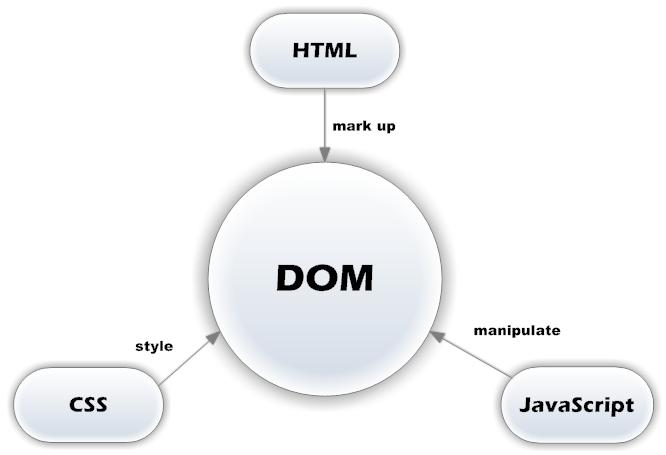
JavaScript runs inside the browser using a JavaScript engine.
Flow:
- HTML loads structure
- CSS styles the page
- JavaScript adds behavior
Example:
- Click a button → JavaScript handles event → UI updates
Variables in JavaScript
Variables are used to store data.
let name = "John";
const age = 25;
var city = "Delhi";
Key Points:
let→ can be updatedconst→ cannot be reassignedvar→ older (avoid in modern code)
Data Types in JavaScript
JavaScript has different types of data:
let name = "John";        // String
let age = 25;            // Number
let isActive = true;     // Boolean
let data = null;         // Null
let value;               // Undefined
Functions in JavaScript
Functions are reusable blocks of code.
function greet(name) {
  return "Hello " + name;
}console.log(greet("Abuzafar"));
Arrow Function:
const greet = (name) => {
  return `Hello ${name}`;
};
Loops in JavaScript
Loops help repeat tasks.
for (let i = 0; i < 5; i++) {
  console.log(i);
}
Other loops:
whileforEach
Conditionals
Used to make decisions.
let age = 18;if (age >= 18) {
  console.log("Adult");
} else {
  console.log("Minor");
}
Arrays
Store multiple values.
let fruits = ["apple", "banana", "mango"];console.log(fruits[0]); // apple
Objects
Store data in key-value pairs.
let user = {
  name: "John",
  age: 25,
  isAdmin: false
};console.log(user.name);
DOM Manipulation
JavaScript can interact with HTML.
document.getElementById("btn").addEventListener("click", () => {
  alert("Button clicked!");
});
Fetch API (Basic)
Used to call APIs.
fetch("https://api.example.com/data")
  .then(res => res.json())
  .then(data => console.log(data));
Where JavaScript is Used
JavaScript Basics apply to:
- 🌐 Websites (UI interactions)
- 📊 Dashboards
- 🔗 APIs (Node.js)
- ⚛️ Frameworks like React & Next.js
- 🛒 E-commerce platforms
Real-World Example
When you:
- Click “Add to Cart”
- Submit a form
- Load new data without refresh
👉 That’s JavaScript in action.
Common Mistakes Beginners Make
- Using
varinstead oflet/const - Not understanding scope
- Ignoring async concepts
- Writing long unstructured code
Conclusion
JavaScript Basics are the first step toward becoming a modern web developer. Once you understand variables, functions, and data types, you can move to advanced topics like:
- ES6+
- Async/Await
- APIs
- Frameworks (React, Next.js)
Start small, practice daily, and build real projects.
FAQs
What are JavaScript Basics?
JavaScript Basics include variables, functions, data types, and syntax needed to build web applications.
Is JavaScript easy for beginners?
Yes, JavaScript Basics are beginner-friendly and widely used.
Where is JavaScript used?
JavaScript is used in web development, mobile apps, backend services, and APIs.