
Introduction
When you build a frontend and backend separately, you will often face CORS errors and token errors. These errors are very common in real projects, especially when your frontend runs on one URL and your backend API runs on another URL.
For example, your frontend may run on:
http://localhost:3000Code language: JavaScript (javascript)And your backend may run on:
http://localhost:4000Code language: JavaScript (javascript)Even though both are running on your laptop, the browser treats them as different origins because the port numbers are different. This is where CORS comes into the picture.
At the same time, if your application uses login, JWT, cookies, or an Authorization header, you may also face token errors like:
401 Unauthorized
JsonWebTokenError: invalid token
TokenExpiredError: jwt expired
Missing Authorization header
In this blog, we will learn how to debug CORS and token errors in Node.js, Express, and Apollo Server using simple English and practical examples. The goal is not just to fix the error once, but to understand why the error happens.
By the end of this guide, you will know how to check browser errors, backend logs, CORS configuration, Authorization headers, JWT verification, and Apollo Server context issues.
What is CORS?
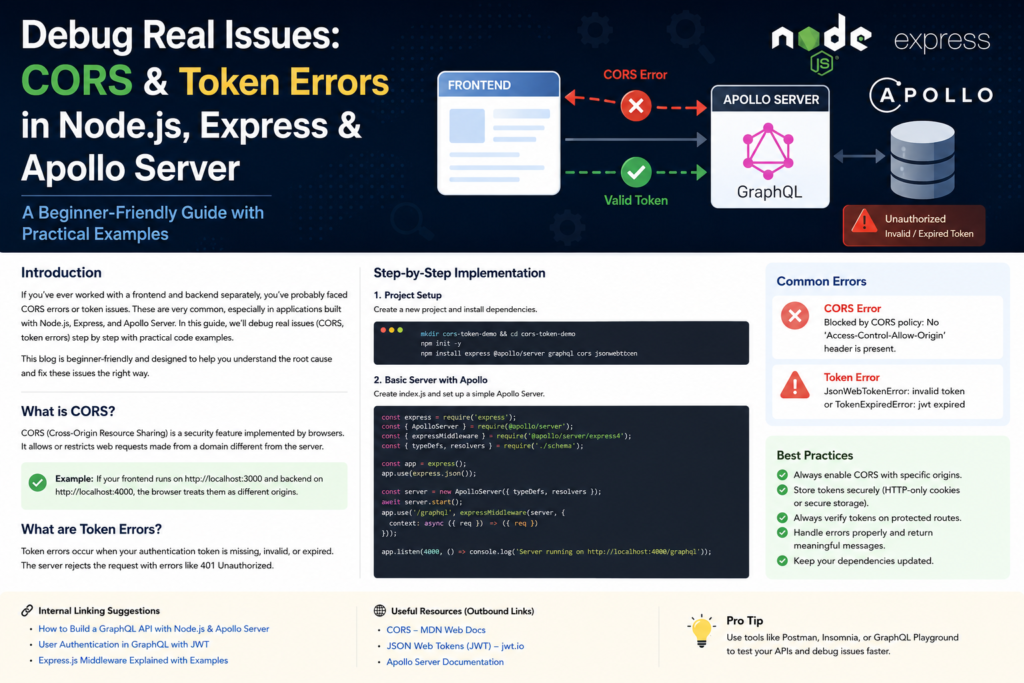
CORS stands for Cross-Origin Resource Sharing. It is a browser security feature.
In simple words, CORS decides whether a frontend website is allowed to read data from a backend server running on a different origin.
An origin is made from three parts:
protocol + domain + portFor example:
http://localhost:3000
http://localhost:4000Code language: JavaScript (javascript)
These two are different origins because the ports are different.
A common CORS error looks like this:
Access to fetch at 'http://localhost:4000/graphql'
from origin 'http://localhost:3000'
has been blocked by CORS policy:
No 'Access-Control-Allow-Origin' header is present
on the requested resource.Code language: JavaScript (javascript)
This error does not always mean your API is down. It usually means the browser did not receive the correct CORS headers from the backend.
What are Token Errors?
Token errors happen when the backend expects an authentication token but the request does not contain a valid token.
Most modern apps use JWT tokens for authentication. After login, the server gives a token to the client. Then the client sends that token with each protected request.
Usually, the token is sent like this:
Authorization: Bearer your_token_hereCode language: HTTP (http)If the token is missing, wrong, expired, or badly formatted, the backend returns an error.
Common token errors are:
401 Unauthorized
403 Forbidden
invalid token
jwt expired
jwt malformed
Cannot read properties of undefinedCode language: JavaScript (javascript)
When you debug CORS and token errors, always remember one important thing: CORS is a browser communication issue, while token errors are authentication issues. Sometimes both happen together, so debugging becomes confusing.
Real Issue Scenario
Let us imagine a real project setup.
Frontend:
Next.js or React app running on http://localhost:3000Code language: JavaScript (javascript)Backend:
Node.js + Express + Apollo Server running on http://localhost:4000/graphqlCode language: JavaScript (javascript)The frontend sends a GraphQL request:
fetch("http://localhost:4000/graphql", {
  method: "POST",
  headers: {
    "Content-Type": "application/json",
    Authorization: `Bearer ${token}`,
  },
  body: JSON.stringify({
    query: `
      query {
        me {
          id
          name
          email
        }
      }
    `,
  }),
});Code language: JavaScript (javascript)
But the browser shows a CORS error. After fixing CORS, the backend shows a token error. This is a very common real-world debugging flow.
Let us fix it step by step.
Step-by-Step Implementation
Step 1: Create a Node.js Project
First, create a new folder and install the required packages.
mkdir cors-token-debug-demo
cd cors-token-debug-demo
npm init -y
npm install express cors graphql @apollo/server @as-integrations/express5 jsonwebtoken dotenv
npm install --save-dev nodemonCode language: JavaScript (javascript)
Add this to your package.json:
{
  "type": "module",
  "scripts": {
    "dev": "nodemon server.js"
  }
}Code language: JSON / JSON with Comments (json)
Now create a file:
server.jsCode language: CSS (css)Step 2: Create a Basic Express and Apollo Server
Here is a basic Apollo Server with Express.
import express from "express";
import cors from "cors";
import jwt from "jsonwebtoken";
import { ApolloServer } from "@apollo/server";
import { expressMiddleware } from "@as-integrations/express5";
import { GraphQLError } from "graphql";

const app = express();

const typeDefs = `#graphql
  type User {
    id: ID!
    name: String!
    email: String!
  }

  type Query {
    health: String!
    me: User!
  }
`;

const resolvers = {
  Query: {
    health: () => "Server is running",
    me: (_, __, context) => {
      if (!context.user) {
        throw new GraphQLError("Unauthorized", {
          extensions: {
            code: "UNAUTHENTICATED",
            http: { status: 401 },
          },
        });
      }

      return context.user;
    },
  },
};

const server = new ApolloServer({
  typeDefs,
  resolvers,
});

await server.start();

app.listen(4000, () => {
  console.log("Server running on http://localhost:4000/graphql");
});Code language: JavaScript (javascript)
At this point, the server is not fully ready because we have not added CORS, JSON parsing, or Apollo middleware.
Step 3: Add Correct CORS Configuration
Now add CORS properly.
const allowedOrigins = ["http://localhost:3000"];

const corsOptions = {
  origin: function (origin, callback) {
    if (!origin || allowedOrigins.includes(origin)) {
      callback(null, true);
    } else {
      callback(new Error("Not allowed by CORS"));
    }
  },
  credentials: true,
  methods: ["GET", "POST", "OPTIONS"],
  allowedHeaders: ["Content-Type", "Authorization"],
};Code language: JavaScript (javascript)
Now mount Apollo Server middleware:
app.use(
  "/graphql",
  cors(corsOptions),
  express.json(),
  expressMiddleware(server, {
    context: async ({ req }) => {
      const authHeader = req.headers.authorization || "";

      if (!authHeader.startsWith("Bearer ")) {
        return { user: null };
      }

      const token = authHeader.replace("Bearer ", "");

      try {
        const decoded = jwt.verify(token, "my_secret_key");

        return {
          user: {
            id: decoded.id,
            name: decoded.name,
            email: decoded.email,
          },
        };
      } catch (error) {
        console.error("Token verification failed:", error.message);

        return { user: null };
      }
    },
  })
);Code language: JavaScript (javascript)
Now your full server.js will look like this:
import express from "express";
import cors from "cors";
import jwt from "jsonwebtoken";
import { ApolloServer } from "@apollo/server";
import { expressMiddleware } from "@as-integrations/express5";
import { GraphQLError } from "graphql";

const app = express();

const allowedOrigins = ["http://localhost:3000"];

const corsOptions = {
  origin: function (origin, callback) {
    if (!origin || allowedOrigins.includes(origin)) {
      callback(null, true);
    } else {
      callback(new Error("Not allowed by CORS"));
    }
  },
  credentials: true,
  methods: ["GET", "POST", "OPTIONS"],
  allowedHeaders: ["Content-Type", "Authorization"],
};

const typeDefs = `#graphql
  type User {
    id: ID!
    name: String!
    email: String!
  }

  type Query {
    health: String!
    me: User!
  }
`;

const resolvers = {
  Query: {
    health: () => "Server is running",
    me: (_, __, context) => {
      if (!context.user) {
        throw new GraphQLError("Unauthorized", {
          extensions: {
            code: "UNAUTHENTICATED",
            http: { status: 401 },
          },
        });
      }

      return context.user;
    },
  },
};

const server = new ApolloServer({
  typeDefs,
  resolvers,
});

await server.start();

app.use(
  "/graphql",
  cors(corsOptions),
  express.json(),
  expressMiddleware(server, {
    context: async ({ req }) => {
      const authHeader = req.headers.authorization || "";

      if (!authHeader.startsWith("Bearer ")) {
        return { user: null };
      }

      const token = authHeader.replace("Bearer ", "");

      try {
        const decoded = jwt.verify(token, "my_secret_key");

        return {
          user: {
            id: decoded.id,
            name: decoded.name,
            email: decoded.email,
          },
        };
      } catch (error) {
        console.error("Token verification failed:", error.message);
        return { user: null };
      }
    },
  })
);

app.listen(4000, () => {
  console.log("Server running on http://localhost:4000/graphql");
});Code language: JavaScript (javascript)
This setup helps you debug CORS and token errors because the CORS setup and token verification logic are both clear.
Step 4: Generate a Test JWT Token
To test the protected me query, you need a valid token.
Create a file called generate-token.js:
import jwt from "jsonwebtoken";

const token = jwt.sign(
  {
    id: "101",
    name: "Abuzafar",
    email: "abuzafar@example.com",
  },
  "my_secret_key",
  {
    expiresIn: "1h",
  }
);

console.log(token);Code language: JavaScript (javascript)
Run it:
node generate-token.jsCode language: CSS (css)Copy the generated token.
Step 5: Test the API from Frontend
Now test your GraphQL API from the frontend.
const token = "paste_your_token_here";

async function getProfile() {
  const response = await fetch("http://localhost:4000/graphql", {
    method: "POST",
    headers: {
      "Content-Type": "application/json",
      Authorization: `Bearer ${token}`,
    },
    body: JSON.stringify({
      query: `
        query {
          me {
            id
            name
            email
          }
        }
      `,
    }),
  });

  const data = await response.json();
  console.log(data);
}

getProfile();Code language: JavaScript (javascript)
If everything is correct, you should get:
{
  "data": {
    "me": {
      "id": "101",
      "name": "Abuzafar",
      "email": "abuzafar@example.com"
    }
  }
}Code language: JSON / JSON with Comments (json)
How to Debug CORS Errors
When you debug CORS and token errors, start with CORS first because a CORS error can hide the real backend response.
1. Check the Browser Console
Open Chrome DevTools and go to the Console tab. Look for messages like:
No 'Access-Control-Allow-Origin' header is presentCode language: JavaScript (javascript)or:
Request header field authorization is not allowedIf you see an Authorization header error, check this part of your CORS config:
allowedHeaders: ["Content-Type", "Authorization"]Code language: CSS (css)2. Check the Network Tab
Go to the Network tab and click the failed request. Check:
- Request URL
- Request Method
- Status Code
- Request Headers
- Response Headers
For CORS, you should see response headers like:
Access-Control-Allow-Origin: http://localhost:3000
Access-Control-Allow-Credentials: trueCode language: JavaScript (javascript)
3. Check the Origin
Your backend CORS config must match your frontend URL exactly.
This is correct:
const allowedOrigins = ["http://localhost:3000"];Code language: JavaScript (javascript)This is different and will not match:
http://127.0.0.1:3000Code language: JavaScript (javascript)Even though localhost and 127.0.0.1 may point to your local machine, the browser treats them as different origins.
4. Do Not Use Wildcard with Credentials
This is a common mistake:
app.use(
  cors({
    origin: "*",
    credentials: true,
  })
);Code language: CSS (css)
If you use cookies or credentials, do not use origin: "*". Use the exact frontend origin instead.
Correct example:
app.use(
  cors({
    origin: "http://localhost:3000",
    credentials: true,
  })
);Code language: CSS (css)
How to Debug Token Errors
After CORS is fixed, you may still get token errors. Now you need to check authentication.
1. Check if Authorization Header is Sent
In the browser Network tab, check Request Headers.
You should see:
Authorization: Bearer eyJhbGciOiJIUzI1NiIs...Code language: HTTP (http)If Authorization is missing, the problem is in the frontend.
Correct frontend code:
headers: {
  "Content-Type": "application/json",
  Authorization: `Bearer ${token}`,
}Code language: JavaScript (javascript)
Wrong frontend code:
headers: {
  "Content-Type": "application/json",
  token: token,
}Code language: JavaScript (javascript)
The backend is checking authorization, so the frontend must send Authorization.
2. Check Bearer Format
The backend expects this:
Bearer token_hereNot this:
token_hereThis code checks the format:
if (!authHeader.startsWith("Bearer ")) {
  return { user: null };
}Code language: JavaScript (javascript)
If you forget Bearer, token verification will not work.
3. Check JWT Secret
The same secret must be used while signing and verifying the token.
Signing:
jwt.sign(payload, "my_secret_key");Code language: JavaScript (javascript)Verifying:
jwt.verify(token, "my_secret_key");Code language: JavaScript (javascript)If you sign with one secret and verify with another secret, you will get an invalid token error.
4. Check Token Expiry
If the token has expired, you may see:
TokenExpiredError: jwt expiredCode language: HTTP (http)Example:
jwt.sign(payload, "my_secret_key", {
  expiresIn: "1h",
});Code language: CSS (css)
For local testing, generate a fresh token and try again.
Apollo Server Context Debugging
In Apollo Server, the context function is very important. It runs for each GraphQL request. You usually read the token inside the context and pass the user to resolvers.
Example:
expressMiddleware(server, {
  context: async ({ req }) => {
    const authHeader = req.headers.authorization || "";
    console.log("Authorization Header:", authHeader);

    return {
      token: authHeader,
    };
  },
});Code language: JavaScript (javascript)
Then in resolver:
const resolvers = {
  Query: {
    me: (_, __, context) => {
      console.log("Context:", context);
      return context.user;
    },
  },
};Code language: JavaScript (javascript)
This helps you understand whether the token is reaching Apollo Server.
Best Practices to Debug CORS and Token Errors
Use Exact Origins in Production
Do not allow every origin in production. Instead of this:
origin: "*"Code language: JavaScript (javascript)Use this:
origin: ["https://yourfrontend.com"]Code language: CSS (css)This is safer and easier to debug.
Keep Secrets in Environment Variables
Do not hard-code JWT secrets in real projects.
Create a .env file:
JWT_SECRET=your_strong_secret_here
CLIENT_URL=http://localhost:3000Code language: JavaScript (javascript)
Use it in code:
import dotenv from "dotenv";
dotenv.config();

const decoded = jwt.verify(token, process.env.JWT_SECRET);Code language: JavaScript (javascript)
Log Carefully
Logging is useful during debugging, but do not log full tokens in production.
Better logging:
console.log("Authorization header exists:", Boolean(authHeader));Code language: JavaScript (javascript)Avoid this in production:
console.log("Full token:", token);Code language: JavaScript (javascript)Return Clear Error Messages
For beginners, clear errors make debugging easier.
throw new GraphQLError("Login required. Token is missing or invalid.", {
  extensions: {
    code: "UNAUTHENTICATED",
  },
});Code language: CSS (css)
Test with Postman or GraphQL Playground
CORS is enforced by browsers. Tools like Postman are useful because they help you check whether the backend itself is working.
If Postman works but browser fails, the issue is probably CORS.
If both Postman and browser fail, the issue is probably backend logic, token verification, or API configuration.
Common Mistakes
Mistake 1: CORS Middleware Added After Routes
Wrong:
app.use("/graphql", expressMiddleware(server));
app.use(cors(corsOptions));Code language: PHP (php)
Correct:
app.use(
  "/graphql",
  cors(corsOptions),
  express.json(),
  expressMiddleware(server)
);Code language: PHP (php)
CORS should be applied before the request reaches your route handler.
Mistake 2: Missing Authorization in Allowed Headers
Wrong:
allowedHeaders: ["Content-Type"]Code language: CSS (css)Correct:
allowedHeaders: ["Content-Type", "Authorization"]Code language: CSS (css)If your frontend sends an Authorization header, your CORS config must allow it.
Mistake 3: Wrong Frontend URL
Wrong:
origin: "http://localhost:3001"Code language: JavaScript (javascript)Correct, if your frontend runs on port 3000:
origin: "http://localhost:3000"Code language: JavaScript (javascript)Always check the exact frontend URL in the browser address bar.
Mistake 4: Token Stored but Not Sent
Sometimes the token is stored in localStorage, but the request does not send it.
Example:
const token = localStorage.getItem("token");

fetch("http://localhost:4000/graphql", {
  method: "POST",
  headers: {
    "Content-Type": "application/json",
    Authorization: `Bearer ${token}`,
  },
});Code language: JavaScript (javascript)
Make sure token is not null.
Mistake 5: Confusing CORS with Authentication
CORS does not protect your API from all users. Authentication protects your API.
CORS controls whether browser JavaScript can read a cross-origin response. Authentication controls whether the user is allowed to access protected data.
You need both in real applications.
Practical Debugging Checklist
Use this checklist whenever you debug CORS and token errors.
CORS Checklist
- Is the backend running?
- Is the frontend URL correct?
- Is CORS middleware added before Apollo middleware?
- Is
Authorizationincluded inallowedHeaders? - Are you using exact origin instead of wildcard?
- Are credentials required?
- Are response headers visible in the Network tab?
Token Checklist
- Is the token available in frontend?
- Is the token sent in the Authorization header?
- Is the format
Bearer token? - Is the JWT secret correct?
- Is the token expired?
- Is Apollo context receiving the token?
- Is the resolver checking
context.usercorrectly?
Conclusion
Learning how to debug CORS and token errors is an important backend skill. These issues happen in almost every real full-stack project where the frontend and backend run separately.
CORS errors usually come from browser security rules, wrong origins, missing headers, or incorrect credentials configuration. Token errors usually come from missing Authorization headers, wrong Bearer format, expired JWT tokens, or wrong JWT secrets.
The best way to debug CORS and token errors is to follow a step-by-step process. First, check the browser console. Then check the Network tab. After that, check backend logs, CORS middleware, Authorization headers, JWT verification, and Apollo Server context.
Once you understand the difference between CORS and authentication, these errors become much easier to fix. In real projects, always use exact origins, keep secrets in environment variables, avoid logging full tokens, and return clear error messages.
If you are working with Node.js, Express, and Apollo Server, this debugging process will save you a lot of time and help you build safer and cleaner APIs.