
Next.js 16 introduced an important change to request handling. The old middleware.ts file convention has been renamed to proxy.ts.
If you previously used Middleware in Next.js, the basic idea will feel familiar. You can use proxy.ts in Next.js to run server-side code before a request reaches a page, Route Handler, or other part of your application.
For example, you can use proxy.ts to:
- Protect dashboard pages
- Redirect unauthenticated users
- Rewrite URLs
- Read cookies
- Add request or response headers
- Handle language-based routing
- Run logic only for selected routes
This guide explains proxy.ts in Next.js in simple English. You will learn where to create the file, how it works, how to protect routes, how to configure matchers, and which common mistakes you should avoid.
What Is proxy.ts in Next.js?
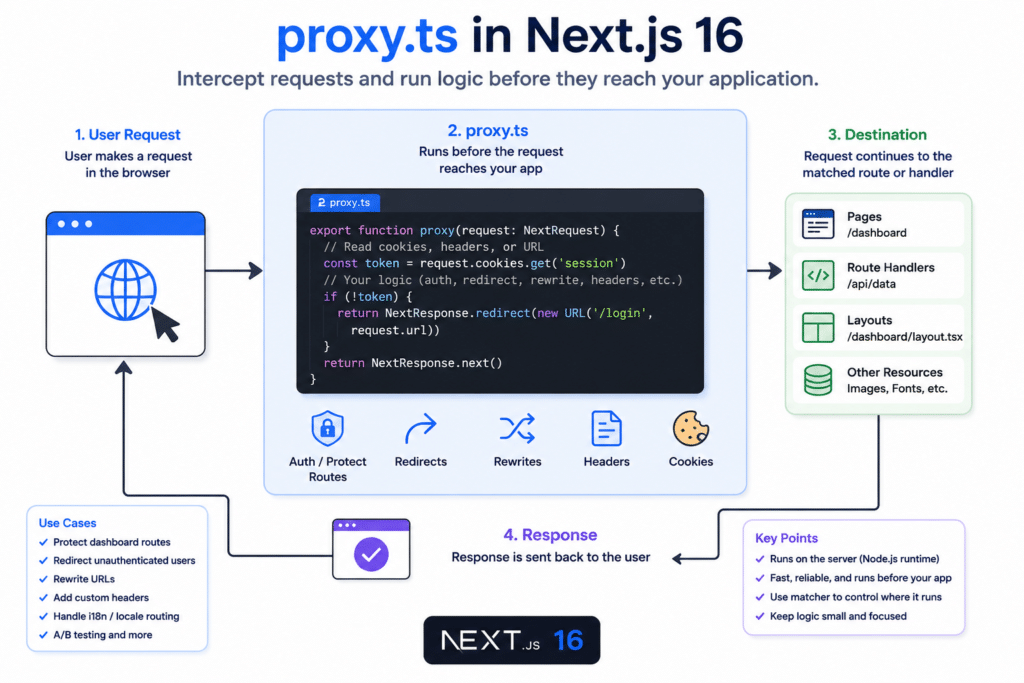
The proxy.ts file is a special Next.js file that runs before a request is completed.
Suppose a user opens:
https://example.com/dashboardCode language: JavaScript (javascript)Before Next.js renders the dashboard page, proxy.ts can inspect the request.
It can check:
- Does the user have a login cookie?
- Is the requested URL allowed?
- Should the user be redirected?
- Should the URL be rewritten?
- Should a custom header be added?
A simple request flow looks like this:
Browser request
      ↓
proxy.ts
      ↓
Page, layout, or Route Handler
      ↓
ResponseCode language: CSS (css)
Starting with Next.js 16, the middleware.ts file convention is deprecated and renamed to proxy.ts. The name was changed to make its network-boundary and routing purpose clearer.
Why Did Next.js Rename middleware.ts to proxy.ts?
The word “middleware” often caused confusion because developers associated it with Express.js middleware.
Express middleware normally runs as part of a chain of backend functions:
app.use((req, res, next) => {
  console.log("Request received");
  next();
});Code language: JavaScript (javascript)
Next.js Middleware had a different role. It worked closer to the routing and network boundary of the application.
The new name, Proxy, better communicates that the file sits between an incoming request and the destination route.
The main change is:
middleware.ts → proxy.tsCode language: CSS (css)The exported function is also renamed:
middleware() → proxy()Where Should You Create proxy.ts?
Create proxy.ts in the root of your Next.js project.
my-next-app/
├── app/
├── public/
├── proxy.ts
├── next.config.ts
├── package.json
└── tsconfig.jsonCode language: PHP (php)
If your project uses a src directory, place the file inside src:
my-next-app/
├── src/
│   ├── app/
│   └── proxy.ts
├── package.json
└── tsconfig.json
Do not create a separate proxy.ts file inside every route folder. A Next.js application supports one main Proxy file.
You can organise complex logic into separate helper files and import those helpers into proxy.ts.
Basic proxy.ts Example
Create a file named proxy.ts:
import { NextRequest, NextResponse } from "next/server";

export function proxy(request: NextRequest) {
  console.log("Requested URL:", request.nextUrl.pathname);

  return NextResponse.next();
}Code language: JavaScript (javascript)
In this example:
NextRequestrepresents the incoming request.NextResponsehelps you continue, redirect, rewrite, or return a response.NextResponse.next()allows the request to continue normally.
When a user visits a matching route, the Proxy function runs before Next.js completes the request.
Step-by-Step Implementation of proxy.ts in Next.js
Let us build a practical route protection example.
Imagine that your application has these routes:
/login
/dashboard
/dashboard/profile
/dashboard/settings
Only authenticated users should access dashboard routes.
Step 1: Create the Proxy File
Create proxy.ts in the project root:
import { NextRequest, NextResponse } from "next/server";

export function proxy(request: NextRequest) {
  return NextResponse.next();
}Code language: JavaScript (javascript)
At this stage, the Proxy allows every request to continue.
Step 2: Read the Authentication Cookie
Assume your application stores a session token in a cookie named session.
Update the file:
import { NextRequest, NextResponse } from "next/server";

export function proxy(request: NextRequest) {
  const session = request.cookies.get("session");

  console.log("Session:", session?.value);

  return NextResponse.next();
}Code language: JavaScript (javascript)
The request.cookies.get() method returns the cookie object when the cookie exists.
You can access its value with:
session?.valueCode language: CSS (css)Step 3: Redirect Unauthenticated Users
Now redirect users who do not have a session cookie:
import { NextRequest, NextResponse } from "next/server";

export function proxy(request: NextRequest) {
  const session = request.cookies.get("session");

  if (!session) {
    return NextResponse.redirect(new URL("/login", request.url));
  }

  return NextResponse.next();
}Code language: JavaScript (javascript)
Here is what happens:
- The user requests a protected page.
- Proxy checks the
sessioncookie. - If the cookie is missing, the user is redirected to
/login. - If the cookie exists, the request continues.
Step 4: Add a Matcher
The previous code could run for more routes than necessary. We only want it to protect dashboard pages.
Add a config object:
import { NextRequest, NextResponse } from "next/server";

export function proxy(request: NextRequest) {
  const session = request.cookies.get("session");

  if (!session) {
    return NextResponse.redirect(new URL("/login", request.url));
  }

  return NextResponse.next();
}

export const config = {
  matcher: ["/dashboard/:path*"],
};Code language: JavaScript (javascript)
The matcher:
"/dashboard/:path*"Code language: JSON / JSON with Comments (json)matches:
/dashboard
/dashboard/profile
/dashboard/settings
/dashboard/anything/elseCode language: JavaScript (javascript)
Now proxy.ts in Next.js will run only for dashboard routes.
Redirect Logged-In Users Away from the Login Page
You may also want to prevent logged-in users from visiting /login.
Here is a more complete example:
import { NextRequest, NextResponse } from "next/server";

export function proxy(request: NextRequest) {
  const session = request.cookies.get("session")?.value;
  const pathname = request.nextUrl.pathname;

  const isDashboardRoute = pathname.startsWith("/dashboard");
  const isLoginRoute = pathname === "/login";

  if (isDashboardRoute && !session) {
    return NextResponse.redirect(new URL("/login", request.url));
  }

  if (isLoginRoute && session) {
    return NextResponse.redirect(new URL("/dashboard", request.url));
  }

  return NextResponse.next();
}

export const config = {
  matcher: ["/dashboard/:path*", "/login"],
};Code language: JavaScript (javascript)
This Proxy handles two conditions:
- A user without a session cannot open the dashboard.
- A user with a session does not need to open the login page.
Preserve the Original Destination URL
A better user experience is to send users back to the page they originally requested after login.
For example, a user tries to visit:
/dashboard/appointmentsInstead of redirecting only to /login, add the original route as a query parameter:
import { NextRequest, NextResponse } from "next/server";

export function proxy(request: NextRequest) {
  const session = request.cookies.get("session")?.value;
  const pathname = request.nextUrl.pathname;

  if (!session && pathname.startsWith("/dashboard")) {
    const loginUrl = new URL("/login", request.url);

    loginUrl.searchParams.set("redirectTo", pathname);

    return NextResponse.redirect(loginUrl);
  }

  return NextResponse.next();
}

export const config = {
  matcher: ["/dashboard/:path*"],
};Code language: JavaScript (javascript)
The user will be redirected to:
/login?redirectTo=/dashboard/appointmentsCode language: JavaScript (javascript)After successful login, your application can read redirectTo and send the user to the original page.
Remember to validate redirect destinations before using them. Never redirect users to an unrestricted external URL supplied through a query parameter.
How to Rewrite a URL with proxy.ts
A redirect changes the URL displayed in the browser. A rewrite serves content from another route without changing the browser URL.
Consider this example:
import { NextRequest, NextResponse } from "next/server";

export function proxy(request: NextRequest) {
  if (request.nextUrl.pathname === "/about-us") {
    return NextResponse.rewrite(new URL("/about", request.url));
  }

  return NextResponse.next();
}Code language: JavaScript (javascript)
When the user visits:
/about-usNext.js serves the content from:
/aboutHowever, the browser can continue displaying /about-us.
Use rewrites when you want to change the internal destination without changing the public URL.
Add Custom Response Headers
You can use proxy.ts in Next.js to add headers to a response.
import { NextRequest, NextResponse } from "next/server";

export function proxy(request: NextRequest) {
  const response = NextResponse.next();

  response.headers.set("X-App-Name", "DevCraftLab");
  response.headers.set("X-Requested-Path", request.nextUrl.pathname);

  return response;
}Code language: JavaScript (javascript)
Custom headers can be useful for:
- Debugging
- Request tracking
- Security configuration
- Identifying application versions
- Passing routing information
Avoid exposing passwords, tokens, database details, or other sensitive information in response headers. Browser users can inspect response headers using developer tools.
Modify Request Headers
You can also pass modified headers to the next part of your application:
import { NextRequest, NextResponse } from "next/server";

export function proxy(request: NextRequest) {
  const requestHeaders = new Headers(request.headers);

  requestHeaders.set("x-current-path", request.nextUrl.pathname);

  return NextResponse.next({
    request: {
      headers: requestHeaders,
    },
  });
}Code language: JavaScript (javascript)
A Server Component or Route Handler can then read the custom header.
For example:
import { headers } from "next/headers";

export default async function Page() {
  const requestHeaders = await headers();
  const currentPath = requestHeaders.get("x-current-path");

  return <h1>Current path: {currentPath}</h1>;
}Code language: JavaScript (javascript)
Use this carefully. Adding unnecessary headers to every request can increase request size and make your application harder to understand.
Country or Language-Based Routing Example
Another use of proxy.ts is language-based routing.
Suppose your website supports English and Hindi:
/en
/hi
You could redirect users who visit the home page:
import { NextRequest, NextResponse } from "next/server";

export function proxy(request: NextRequest) {
  const language = request.headers.get("accept-language");

  if (request.nextUrl.pathname === "/") {
    const destination = language?.startsWith("hi") ? "/hi" : "/en";

    return NextResponse.redirect(
      new URL(destination, request.url)
    );
  }

  return NextResponse.next();
}

export const config = {
  matcher: ["/"],
};Code language: JavaScript (javascript)
This is a simple example. A production application should also consider:
- A saved language preference
- Existing language routes
- Search engine indexing
- Canonical URLs
- Default locale behaviour
Using Multiple Matchers
You can configure multiple routes:
export const config = {
  matcher: [
    "/dashboard/:path*",
    "/admin/:path*",
    "/account/:path*",
  ],
};Code language: JavaScript (javascript)
Proxy will run for all three route groups.
You can also exclude static files and internal Next.js paths with a more advanced matcher:
export const config = {
  matcher: [
    "/((?!api|_next/static|_next/image|favicon.ico|sitemap.xml|robots.txt).*)",
  ],
};Code language: JavaScript (javascript)
This pattern tells Next.js not to run Proxy for common static assets and internal paths.
Advanced matcher expressions can be difficult to read. Add a comment explaining what the matcher includes and excludes.
Migrating from middleware.ts to proxy.ts
If your project currently contains this file:
middleware.tsCode language: CSS (css)You can migrate it manually.
Before Migration
import { NextRequest, NextResponse } from "next/server";

export function middleware(request: NextRequest) {
  return NextResponse.next();
}Code language: JavaScript (javascript)
After Migration
Rename the file:
middleware.ts → proxy.tsCode language: CSS (css)Rename the exported function:
import { NextRequest, NextResponse } from "next/server";

export function proxy(request: NextRequest) {
  return NextResponse.next();
}Code language: JavaScript (javascript)
Next.js also provides a codemod for migration:
npx @next/codemod@canary middleware-to-proxy .Code language: CSS (css)The codemod can rename the file and update the function convention automatically.
Commit or back up your code before running migration tools so that you can review the changes safely.
Important Runtime Change in Next.js 16
The current proxy.ts convention uses the Node.js runtime.
You should not try to configure it like this:
export const runtime = "edge";Code language: JavaScript (javascript)That configuration is not supported for Proxy.
This distinction matters when you are using authentication, session, database, or utility libraries. Confirm that your library supports the Node.js runtime and does not depend exclusively on Edge Runtime behaviour.
Should You Verify Authentication Inside proxy.ts?
Proxy is useful for checking whether a session appears to exist and for making fast routing decisions.
However, you should not depend only on Proxy to secure sensitive data.
For example, this check is useful:
const session = request.cookies.get("session")?.value;

if (!session) {
  return NextResponse.redirect(new URL("/login", request.url));
}Code language: JavaScript (javascript)
But a cookie being present does not automatically mean it is valid.
Your protected Server Component, Server Action, or Route Handler should still validate the session before returning confidential information or performing sensitive operations.
A secure flow may look like this:
Proxy:
Perform a quick cookie check and redirect when missing.

Protected server code:
Verify the session and confirm the user’s permissions.

Database operation:
Allow the action only after authorization succeeds.Code language: JavaScript (javascript)
Authentication answers:
Who is this user?Code language: JavaScript (javascript)Authorization answers:
Is this user allowed to perform this action?Code language: JavaScript (javascript)Both checks are important.
When Should You Use proxy.ts?
Use proxy.ts in Next.js when logic must run before a request reaches its destination.
Good use cases include:
- Authentication redirects
- Simple authorization routing
- URL redirects
- Conditional rewrites
- Locale detection
- A/B testing
- Request or response headers
- Request tracking
- Blocking selected routes
Do not automatically place every server-side task inside Proxy.
For example, a simple static redirect may be easier to maintain in next.config.ts. Data mutations generally belong in Server Actions or Route Handlers. Database-heavy business logic should usually remain in a dedicated server-side function.
Best Practices for proxy.ts in Next.js
1. Use a Matcher
Do not run Proxy for every request unless your application genuinely needs it.
export const config = {
  matcher: ["/dashboard/:path*"],
};Code language: JavaScript (javascript)
A focused matcher reduces unnecessary execution.
2. Keep Proxy Logic Small
Proxy runs before the requested route is completed. Large operations can slow down navigation.
Avoid doing the following unless absolutely necessary:
- Multiple database queries
- Slow external API requests
- Heavy data transformation
- Large loops
- Complex business operations
Use Proxy mainly for quick routing decisions.
3. Protect Data Again on the Server
A Proxy redirect improves navigation and access control, but your Route Handlers, Server Actions, and server-side data functions must still validate the user.
Never treat a hidden page as a secure page.
4. Avoid Redirect Loops
Make sure the destination page is not protected by the same condition.
Bad logic:
if (!session) {
  return NextResponse.redirect(new URL("/login", request.url));
}Code language: JavaScript (javascript)
If this code also runs for /login, the login page redirects to itself forever.
A safer implementation is:
if (!session && request.nextUrl.pathname !== "/login") {
  return NextResponse.redirect(new URL("/login", request.url));
}Code language: JavaScript (javascript)
An even better solution is to use a matcher that includes only protected routes.
5. Use Clear Cookie Names
Instead of vague names such as:
token
data
user
use descriptive names such as:
session
admin_session
access_token
Do not place sensitive user information directly inside an unprotected cookie.
6. Validate Redirect URLs
When using a redirectTo query parameter, allow only safe internal paths.
For example:
function getSafeRedirectPath(value: string | null) {
  if (!value || !value.startsWith("/") || value.startsWith("//")) {
    return "/dashboard";
  }

  return value;
}Code language: JavaScript (javascript)
This helps prevent open redirect vulnerabilities.
7. Add Comments to Complex Matchers
A complicated matcher may work today but confuse you later.
export const config = {
  // Run on application pages, but exclude API routes,
  // Next.js assets, images, and common metadata files.
  matcher: [
    "/((?!api|_next/static|_next/image|favicon.ico|sitemap.xml|robots.txt).*)",
  ],
};Code language: JavaScript (javascript)
Common Mistakes When Using proxy.ts
Mistake 1: Keeping the Function Name as middleware
After renaming the file, developers sometimes forget to rename the function.
Incorrect:
export function middleware() {
  // ...
}Code language: JavaScript (javascript)
Correct:
export function proxy() {
  // ...
}Code language: JavaScript (javascript)
Mistake 2: Creating proxy.ts Inside the app Folder
This structure is normally incorrect:
app/
├── proxy.ts
├── page.tsx
└── layout.tsx
Place the file in the project root, or inside src when your application uses the src structure.
Mistake 3: Forgetting to Return NextResponse.next()
Incorrect:
export function proxy(request: NextRequest) {
  console.log(request.nextUrl.pathname);
}Code language: JavaScript (javascript)
Correct:
export function proxy(request: NextRequest) {
  console.log(request.nextUrl.pathname);

  return NextResponse.next();
}Code language: JavaScript (javascript)
Every path through your function should return the intended response.
Mistake 4: Running Expensive Code on Every Request
This can harm performance:
export async function proxy() {
  const data = await fetch("https://slow-api.example.com/data");
  const result = await data.json();

  return NextResponse.next();
}Code language: JavaScript (javascript)
If the API is slow, every matching request may become slow.
Keep Proxy fast and move expensive work to a more suitable server-side layer.
Mistake 5: Trusting Cookie Presence as Full Authentication
This is not enough for sensitive operations:
const token = request.cookies.get("session");

if (token) {
  return NextResponse.next();
}Code language: JavaScript (javascript)
An invalid or expired cookie may still exist. Validate the actual session in your protected server-side code.
Mistake 6: Protecting Static Assets Accidentally
Running Proxy for JavaScript bundles, images, icons, and other static resources can create unnecessary work or unexpected behaviour.
Use a matcher to exclude routes such as:
/_next/static
/_next/image
/favicon.icoCode language: JavaScript (javascript)
Mistake 7: Trying to Use Edge Runtime Configuration
The Next.js 16 proxy.ts convention uses the Node.js runtime. Do not add an unsupported Edge Runtime configuration to the file.
Complete Practical Example
Here is a beginner-friendly example that protects dashboard routes, redirects logged-in users away from the login page, and preserves the original destination:
import { NextRequest, NextResponse } from "next/server";

export function proxy(request: NextRequest) {
  const session = request.cookies.get("session")?.value;
  const pathname = request.nextUrl.pathname;

  const isProtectedRoute = pathname.startsWith("/dashboard");
  const isLoginRoute = pathname === "/login";

  if (isProtectedRoute && !session) {
    const loginUrl = new URL("/login", request.url);

    loginUrl.searchParams.set("redirectTo", pathname);

    return NextResponse.redirect(loginUrl);
  }

  if (isLoginRoute && session) {
    return NextResponse.redirect(
      new URL("/dashboard", request.url)
    );
  }

  return NextResponse.next();
}

export const config = {
  matcher: ["/dashboard/:path*", "/login"],
};Code language: JavaScript (javascript)
This is a good starting point, but your protected server code should still verify the session before reading private data.
Frequently Asked Questions
Is middleware.ts removed in Next.js 16?
The middleware.ts convention is deprecated and has been renamed to proxy.ts. Developers should migrate new and existing projects to the Proxy convention where appropriate.
Is proxy.ts the same as Express middleware?
No. Express middleware is part of an application’s backend request-handler chain. Next.js Proxy works at the routing and network boundary before a request reaches its destination.
Can I use proxy.ts for authentication?
Yes. It is useful for quick session checks and authentication redirects. However, sensitive server operations should perform their own complete session validation and authorization checks.
Where should proxy.ts be placed?
Place it in the project root. If your application uses a src directory, place it inside src.
Can proxy.ts access cookies?
Yes. You can read a cookie using:
const session = request.cookies.get("session")?.value;Code language: JavaScript (javascript)Can I use the Edge Runtime in proxy.ts?
The Next.js 16 Proxy convention uses the Node.js runtime and does not support configuring the file to use the Edge Runtime.
What is the difference between redirect and rewrite?
A redirect sends the browser to another URL, so the displayed URL changes. A rewrite serves content from another destination while keeping the original public URL visible.
Conclusion
The introduction of proxy.ts in Next.js is mainly a naming and architectural clarification for developers upgrading to Next.js 16.
Proxy allows you to run server-side logic before a request is completed. You can use it for route protection, redirects, rewrites, language routing, cookies, and request or response headers.
The most important points to remember are:
- Rename
middleware.tstoproxy.ts. - Rename the exported
middlewarefunction toproxy. - Place
proxy.tsin the root orsrcdirectory. - Use matchers to control where Proxy runs.
- Keep Proxy logic fast and focused.
- Do not rely on Proxy as your only security layer.
- Validate sessions and permissions again in protected server code.
- Remember that Next.js 16 Proxy uses the Node.js runtime.
When used carefully, proxy.ts in Next.js provides a clean and powerful way to control requests before they reach your application routes.
Great content! Keep up the good work!
Thank you