
GraphQL has become one of the most popular technologies for building modern APIs. If you are working with Node.js, Apollo Server, or any GraphQL backend, understanding GraphQL Context is extremely important. Context helps you share common data like authentication details, database models, tokens, and request information across all resolvers.
In this guide, you will learn:
- What GraphQL Context is
- Why it is important
- How to create and use Context
- Authentication using Context
- Best practices for GraphQL Context
If you are learning GraphQL backend development, this concept is essential for building secure and scalable APIs.
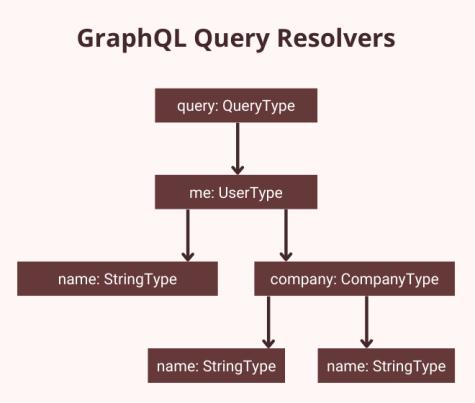
What is GraphQL Context?
In GraphQL, Context is a shared object created for every request. It allows you to pass common data to all resolvers without manually sending it again and again.
For example, you can store:
- Logged-in user information
- Database models
- Authentication tokens
- API keys
- Request headers
- Utility functions
The context object is available in every resolver.
A GraphQL resolver usually receives four parameters:
(parent, args, context, info)Code language: PHP (php)Here:
parent→ Previous resolver resultargs→ Query or mutation argumentscontext→ Shared request-level datainfo→ GraphQL execution details
The context parameter is the most important when building secure APIs.
Why GraphQL Context is Important
Without Context, you would need to manually pass authentication or database information into every resolver. That quickly becomes messy and difficult to maintain.
GraphQL Context solves this problem.
Benefits of GraphQL Context
1. Centralized Authentication
You can verify JWT tokens once and access the logged-in user everywhere.
2. Cleaner Resolvers
Resolvers remain simple because shared logic stays inside Context.
3. Database Access
You can pass database models globally instead of importing them repeatedly.
4. Better Scalability
Large GraphQL applications become easier to manage.
5. Improved Security
Context allows secure access control for protected routes.
Setting Up GraphQL Context
Let’s create a simple GraphQL server using Apollo Server and Express.
Step 1: Install Dependencies
npm init -yInstall packages:
npm install express @apollo/server graphql cors body-parser jsonwebtokenCode language: CSS (css)Step 2: Create Project Structure
src/
 ├── index.js
 ├── schema.js
 ├── resolvers.js
 └── context.js
Step 3: Create GraphQL Schema
schema.js
export const typeDefs = `#graphql
  type Query {
    message: String
    profile: String
  }
`;Code language: JavaScript (javascript)
Step 4: Create Resolvers
resolvers.js
export const resolvers = {
  Query: {
    message: () => {
      return "Public Route";
    },

    profile: (_, __, context) => {
      if (!context.user) {
        throw new Error("Unauthorized");
      }

      return `Welcome ${context.user.name}`;
    },
  },
};Code language: JavaScript (javascript)
Here we are using context.user for authentication.
Step 5: Create Context File
context.js
import jwt from "jsonwebtoken";

export const contextFunction = async ({ req }) => {
  const authHeader = req.headers.authorization || "";

  if (!authHeader) {
    return { user: null };
  }

  try {
    const token = authHeader.replace("Bearer ", "");

    const decoded = jwt.verify(token, "MY_SECRET_KEY");

    return {
      user: decoded,
    };
  } catch (error) {
    return {
      user: null,
    };
  }
};Code language: JavaScript (javascript)
This file:
- Reads the JWT token
- Verifies it
- Stores decoded user information inside Context
Step 6: Configure Apollo Server
index.js
import express from "express";
import cors from "cors";
import bodyParser from "body-parser";
import { ApolloServer } from "@apollo/server";
import { expressMiddleware } from "@as-integrations/express5";

import { typeDefs } from "./schema.js";
import { resolvers } from "./resolvers.js";
import { contextFunction } from "./context.js";

const app = express();

const server = new ApolloServer({
  typeDefs,
  resolvers,
});

await server.start();

app.use(
  "/graphql",
  cors(),
  bodyParser.json(),
  expressMiddleware(server, {
    context: contextFunction,
  })
);

app.listen(4000, () => {
  console.log("Server running on port 4000");
});Code language: JavaScript (javascript)
Now Context is available in every resolver.
How Authentication Works in GraphQL Context
The authentication flow usually works like this:
Step 1: User Logs In
The server generates a JWT token after successful login.
Step 2: Client Sends Token
The frontend sends the token in headers:
Authorization: Bearer YOUR_TOKENCode language: HTTP (http)Step 3: Context Verifies Token
The context function validates the JWT token.
Step 4: Resolvers Access User
Protected resolvers can access:
context.userCode language: CSS (css)This is one of the most common authentication patterns in GraphQL APIs.
Example GraphQL Query
Public Query
query {
  message
}
Protected Query
query {
  profile
}
If the token is valid:
{
  "data": {
    "profile": "Welcome Abu"
  }
}Code language: JSON / JSON with Comments (json)
If the token is invalid:
{
  "errors": [
    {
      "message": "Unauthorized"
    }
  ]
}Code language: JSON / JSON with Comments (json)
Best Practices for GraphQL Context
Keep Context Lightweight
Avoid putting large objects inside Context.
Verify JWT Once
Authentication should happen inside Context instead of every resolver.
Do Not Store Sensitive Secrets
Never expose private environment variables inside Context responses.
Use Separate Files
Keep Context logic inside a dedicated context.js file.
Add Database Models
You can pass MongoDB or SQL models through Context:
return {
  user: decoded,
  models: {
    User,
    Product,
  },
};Code language: CSS (css)
Common Use Cases of GraphQL Context
GraphQL Context is commonly used for:
- JWT Authentication
- Role-based Authorization
- Database Access
- API Integrations
- Logging
- Request Tracking
- Multi-tenant Applications
Conclusion
GraphQL Context is one of the most powerful features in GraphQL backend development. It helps create clean, scalable, and secure APIs by sharing common request-level data across resolvers.
If you are building APIs using Apollo Server, Express, or Node.js, mastering Context is essential. Most real-world GraphQL applications use Context for authentication, database handling, and request management.
Once you understand Context properly, implementing features like JWT authentication, role-based access, and protected resolvers becomes much easier.
You can continue learning GraphQL with topics like:
- JWT Authentication in GraphQL
- Merging Multiple GraphQL Resolvers
- GraphQL Middleware
- Role-Based Authorization
- Apollo Server Best Practices
For official documentation, visit Apollo GraphQL and GraphQL Official Website